Vibe Chat - Pillow Talk
- 4.2
- Rating
- 50.00K
- Installs
- Free
- Price

 Analysis by App-foxy
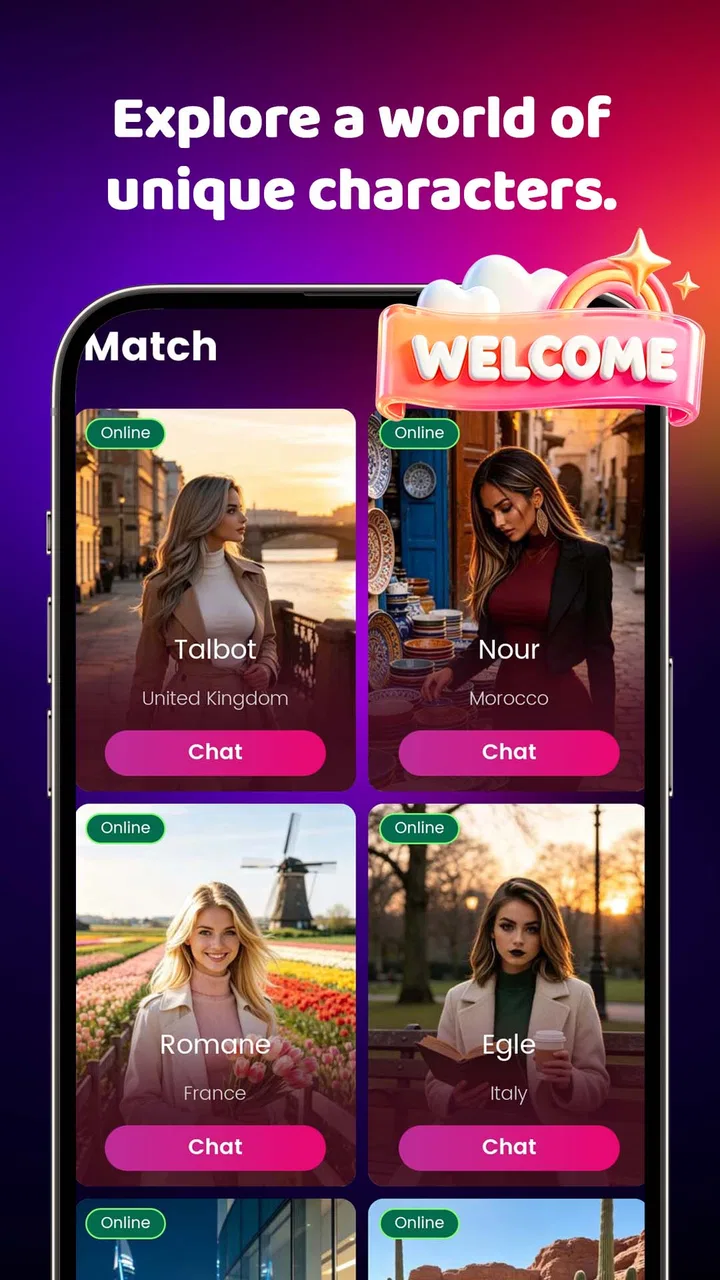
I approached Vibe Chat - Pillow Talk as an entertainment app for moments when I wanted a digital companion shaped around my mood rather than another general-purpose social feed. That distinction matters. Its appeal is not that it replaces every chat service, but that it offers a more focused way to start a conversation when I want atmosphere, attention, or a little company without deciding whom to message first.
The app is free, comes from ASDA TREASURER, and is aimed at mature users aged 17 and over. It has reached over 50 thousand installs and holds a 4.2 average from around 451 ratings, which suggests that the basic idea is connecting with a real audience. I would still treat those figures as a starting point rather than proof that every conversation will suit every user. The experience depends heavily on what mood I bring to it and how clearly I use it.
Getting past the first points of friction
The first thing I would tell a friend is not to judge the app too quickly if the opening interaction feels slower or less intuitive than expected. A mood-based companion app asks the user to make a choice before the useful part begins, and that can create a small mental hurdle. Instead of immediately opening a familiar inbox, I have to understand what kind of exchange I want and then communicate that preference through the available interface.
You May Also Like

 Pandora - Music & Podcasts
Pandora’s Music Is Easy to Start, but Harder to Recover
Pandora’s strength is its low-effort path from a seed to a station. Its weak spot is how much confidence it asks you to place in connection, setup, and quiet recovery.

 8 Ball Pool
8 Ball Pool Is Built on Rivalries, Rematches, and Routine
A close look at the rivalries, rematches, shared routines, and unanswered safety questions that turn a quick pool match into a persistent mobile community.

 Samsung Music
Samsung Music’s Quiet Strength Is Playing What You Already Own
Its reach comes less from spectacle than from dependable access to a personal library. That simplicity is both the app’s strongest retention engine and its ceiling.

 AccuWeather: Weather Radar
AccuWeather Review: A Quick, Clear Forecast for Everyday Decisions
For everyday plans, the best forecast is the one you can understand quickly. AccuWeather makes rain timing, radar, and local conditions easy to act on, with a few trade-offs.

 Hill Climb Racing
Why Hill Climb Racing Still Turns Crashes Into One More Run
A tiny car, a bumpy hill and one more upgrade: Hill Climb Racing keeps resurfacing because its simple chaos makes every near-miss feel personal.

 AliExpress - Shopping App
AliExpress Makes Global Shopping Feel Personal, but Shoppers Bear the Risk
AliExpress turns a global marketplace into a pocket-sized discovery engine. Its reach is useful, its shopping loop compelling, and its trade-offs easy to miss.
More From Our News Desk
View All News


That makes the first session important. I would begin with a simple intention, such as wanting a relaxed chat after work, rather than trying to test every possible mood at once. A narrow starting point makes it easier to see whether the selected partner and tone actually fit. If the conversation feels wrong, changing the direction is more informative than forcing several unrelated prompts into the same session.
Users can also get stuck because they expect a digital partner to understand an unspoken emotional context. In practice, I found that a short, direct opening works better than a vague greeting. Saying that I want a light conversation, a quiet exchange, or a distraction gives the interaction a usable frame. This is one of the less obvious lessons with the app: the quality of the first instruction strongly affects how quickly the experience feels personal.
Another point of friction is the mature rating. It sets a clear boundary around the intended audience, so I would not install this for a child or hand it over as a general family entertainment app. Adults should also approach it as a conversational entertainment product, not as a substitute for professional advice, emergency help, or a dependable human support network. That distinction keeps expectations realistic from the beginning.
What to check before blaming the app
Before assuming something is broken, I would run through a few ordinary checks. I would confirm that the device is using Android 8.0 or later, since that is the minimum operating system listed for the app. I would then close and reopen it, check that the connection is stable, and make sure the newest available release is installed. The current version is 1.0.1, so keeping the installation current is a sensible first step when screens behave unexpectedly.
I would also separate three different problems: an app that will not open, a conversation that does not feel relevant, and a response that appears delayed. They need different reactions. Restarting the app may help with the first. Rephrasing the request is more useful for the second. Waiting briefly or trying again later is more reasonable for the third than repeatedly tapping the same control.
My preferred setup is deliberately simple. I install the app on the device I normally use for private conversations, open it when I have enough time to test one complete exchange, and start with a plainly worded mood. I avoid judging it during a rushed commute or while switching between several demanding tasks. That is not a technical requirement; it is a practical way to distinguish an awkward moment from a poor fit.
If the app opens but the experience feels confusing, I would look for the most direct route to choosing a digital partner or mood instead of exploring every visible option. New entertainment apps often feel more complicated when I treat the first screen like a settings panel. Here, the useful test is whether I can move from intention to conversation without unnecessary effort.
There is also a useful privacy habit that applies especially well to this kind of product: I would avoid entering identifying details, passwords, financial information, or sensitive information about another person. A mood-based chat can feel informal, which may encourage oversharing. Keeping the first conversations general lets me evaluate the tone and usefulness without creating a risk that has nothing to do with entertainment value.
Recovering a conversation that goes off track
When a chat loses its rhythm, I would not immediately abandon the app. First, I would restate the goal in one sentence. For example, instead of adding several questions, I might say that I want a calm conversation with short replies, or that I am looking for something playful rather than serious. This gives the exchange a chance to recover without making the interaction feel like a technical test.
A second useful technique is to change one variable at a time. If I alter the mood, subject, and expected reply style all at once, I cannot tell what improved the result. I would keep the topic and adjust the tone, or keep the tone and change the topic. That small experiment is more efficient and gives me a clearer sense of what this particular partner handles well.
I would also start a fresh exchange when the conversation has accumulated too much irrelevant context. Continuing to correct a drifting chat can be more tiring than beginning again with a clean request. This is a practical trade-off: continuity may feel natural, but a reset can produce a more focused result when the original direction has become muddled.
One of my favorite ways to use the app is as a short transition between activities. After finishing work, I can choose a lighter mood and use the conversation to mentally separate the day from the evening. In that situation, I am not asking for deep insight. I want a low-pressure interaction that helps me change pace. The app makes more sense in that role than as a replacement for a long conversation with a close friend.
It can also work for people who hesitate before starting a normal chat. Opening a messaging app and deciding whom to contact can carry social pressure. A curated digital partner removes that particular decision. The benefit is convenience and low commitment; the cost is that the exchange may not have the unpredictability, shared history, or emotional depth of a real relationship.
When the app is not actually the problem
Not every unsatisfying session points to a software fault. Sometimes the chosen mood conflicts with the subject I introduce. A playful direction may not suit a heavy question, while a quiet setting may feel dull if I want fast, energetic back-and-forth. In those cases, I would change my expectation or select a different mood before concluding that the app is failing.
My own state also matters. If I am exhausted, distracted, or looking for reassurance from a real person, a digital companion may feel hollow regardless of how smoothly it works. That is not a defect I can solve with repeated prompts. The better choice may be to call someone I trust, take a break, or use a different kind of entertainment entirely.
The same applies to connection problems. If other apps are also loading slowly, the issue is probably broader than this installation. I would test the device connection with an ordinary service, restart the app once, and avoid repeatedly changing settings without a clear reason. Safe troubleshooting is usually more effective when it is limited and methodical.
Compared with a standard messaging service, this app is easier when I want a conversation without recruiting another person, but less suitable when I need a real contact, dependable continuity, or a shared history. Compared with a social network, it is more focused and less cluttered by public posts, yet it offers less of the discovery and community that make social platforms engaging. Compared with a general chatbot, its mood-centered identity is more approachable for casual entertainment, although users who want broad research, writing tools, or task automation should look elsewhere.
That comparison also explains who should skip it. I would not recommend it to someone seeking therapy, crisis support, factual research, a full social network, or a robust productivity assistant. I would also skip it if I wanted every conversation to feel deeply personal or consistently insightful. The app is better understood as a guided entertainment experience with a conversational surface.
Small habits that make daily use better
I would keep early sessions short and purposeful. A brief conversation makes it easier to notice whether the selected mood is working, and it prevents a mediocre exchange from becoming a frustrating time sink. If the tone is good, I can continue; if not, I can reset or leave without feeling that I have invested too much.
I would also avoid treating the first response as a final verdict. A single prompt can be unclear, and a single awkward reply can happen in any interactive system. I prefer to make one clean correction, then judge the next exchange. If I have to keep explaining the same basic intention, however, that is useful evidence that the app may not match what I want.
Another practical insight is to use the app for a defined emotional transition rather than an undefined need for “something better.” “Help me unwind for a few minutes” is a workable purpose. “Make me feel completely different” is too large an expectation for an entertainment app. Clear boundaries make the experience more enjoyable and reduce the temptation to rely on it for needs it was not designed to meet.
I would also review the conversation context before sharing anything personal. Even when the chat feels intimate, I would keep names, addresses, workplace details, account credentials, and private information about friends out of it. This is not a criticism unique to Vibe Chat - Pillow Talk; it is a sensible rule for any digital conversation that encourages openness.
The developer is ASDA TREASURER, and the app is still at an early version, so I would expect some rough edges to remain possible. That does not automatically make it poor, but it does make patience and clear feedback more valuable. If a problem persists after a restart, a sensible system check, and a fresh conversation, I would record exactly what happened rather than repeatedly guessing at fixes.
My practical verdict after using it
I see Vibe Chat - Pillow Talk as a niche entertainment app for adults who want a mood-led digital conversation with very little social pressure. Its strongest quality is the way it frames chatting around how I feel in the moment. That makes it easier to start than a blank messaging screen, especially during small breaks, quiet evenings, or transitions between responsibilities.
Its limitations are just as important. The experience cannot provide the shared history of a friend, the reliability of a professional service, or the broad toolset of a general assistant. Some sessions may need clearer direction, and users who expect instant emotional understanding could be disappointed. I would judge it by whether it gives me an enjoyable, low-commitment exchange, not by whether it solves every conversational need.
The free price makes experimentation straightforward, while the mature audience rating tells me to keep it away from children and to use sensible boundaries around personal information. With Android 8.0 or later and version 1.0.1 in place, I would start with one specific mood, test a short exchange, and reset rather than wrestle with a conversation that has clearly drifted.
My recommendation is therefore selective but positive. If you want a focused digital partner for casual mood-based entertainment, I think it is worth trying. If you need human connection, professional guidance, detailed information, or a conventional social platform, another option will serve you better. The right way to use it is as a small, intentional part of an evening—not as a replacement for the people and services that handle serious needs.
FAQs for Vibe Chat - Pillow Talk
01What is Vibe Chat - Pillow Talk, and what can I use it for?
Vibe Chat - Pillow Talk is designed for relaxed, personal conversations, especially between couples or people who want a more intimate way to connect. Based on its concept, the app focuses on sharing thoughts, feelings, questions, and meaningful moments rather than fast, public social networking. It may be useful for starting deeper conversations, learning more about someone, or keeping a romantic connection active when you are apart.
02Is Vibe Chat - Pillow Talk suitable for couples and long-distance relationships?
Yes, the app is particularly suited to couples and long-distance partners who want prompts or a dedicated space for thoughtful conversations. It can help avoid repetitive small talk by encouraging users to discuss emotions, memories, expectations, and relationship topics. However, it should be viewed as a conversation aid rather than a replacement for honest communication, video calls, or spending quality time together.
03Does Vibe Chat - Pillow Talk require both people to install the app?
The exact experience may depend on the app’s current version and sharing features. Some functions can potentially be used individually, while connected or shared activities may require both participants to have access to the application. Before downloading, check the latest Google Play Store or App Store description for information about invitations, account linking, supported devices, and whether conversations or activities can be shared with another person.
04Is Vibe Chat - Pillow Talk free to download and use?
Availability and pricing can vary by platform, country, and app version. The application may be free to install while offering optional premium features, subscriptions, or in-app purchases. We recommend checking the store listing carefully before confirming a purchase, paying attention to trial periods and renewal terms. Also review the app’s permissions and privacy policy so you understand how your information may be handled.
05Is Vibe Chat - Pillow Talk safe and private for personal conversations?
Because the app is intended for intimate or personal discussions, privacy should be considered before sharing sensitive information. Use a strong device passcode, avoid posting details that could identify you or someone else, and review the permissions requested during setup. Privacy protections can change with updates, so read the developer’s current privacy policy and app-store disclosures. Do not assume that every conversation is fully anonymous or end-to-end encrypted unless this is clearly stated.
Pros
- Private
- relaxed setting encourages more personal conversations.
- Simple interface makes starting or joining chats quick.
- Useful for meeting people with similar relationship interests.
- Lightweight app runs smoothly on most modern phones.
- Conversation-focused design avoids unnecessary social media clutter.
Cons
- The user base may be smaller outside peak hours or certain regions.
- Some conversations can become repetitive without active moderation.
- Privacy settings should be checked carefully before sharing personal details.
- Matching quality may vary depending on how many users are online.
- Some features may require in-app purchases or account registration.

Vibe Chat - Pillow Talk
Gallery